

- Published on
Pollen Picks: Where did it go? Why Send now changed my whole build plan (Behind the Desk #4)
- Authors

- Name
- Alex Siega
- Title
- APP Founder
- Socials
NOTE
🪑 Behind the Desk: Pollen Picks edition
Behind the Desk is where I share founder’s notes from running Amsterdam Parent Project. This edition is about Pollen Picks, the newsletter-to-socials tool I’m building for APP and entering in a contest called Buffer Commit. Transparency is one of APP’s core values, and I'm sharing my Pollen Picks build journey like I do everything else: what worked, what broke, and what I got wrong. (Always written by me, not AI 🤖)
Pollen Picks solves my own pain point: turning APP's newsletter’s activity roundup into social posts without another every-other-Sunday panic. I’m a local toddler mom and run APP solo, so time is my greatest asset — making tools like Pollen Picks essential to APP.
I'm on a mission to use my skills to create deeply integrated community care for local & expat postpartum families in Amsterdam. Join me ❤️
How Pollen Picks and Buffer work together, seamlessly
This post is about Pollen Picks' lines of defense to ensure a post is never lost, duplicated, or arrives to Buffer broken — while still maintaining a seamless user experience.
The first plan: drafts only
Ah, the age-old software development principle, KISS: "Keep it simple, stupid." With a short contest window, I originally planned for a much simpler build, laser focused on the central goal: a carousel from the Buffer API, not a rebuilt Buffer. So: I focused on drafts only. Pollen Picks builds the slides, Buffer manages the send-to-network: send now, later, or keep as draft. Drafts are way easier to maintain, and forgiving in the case that anything goes wrong — your social followers wouldn't ever know.
The pivot: one fewer tool hop
Then I started using Pollen Picks myself, and I kept repeating the same hop into Buffer just to find my draft's "Publish now" button. The API supports Send now. The PM in me screamed "Scope creep!", but Send now and Create draft are both real user journeys, so I built it.
"Where did it go?"
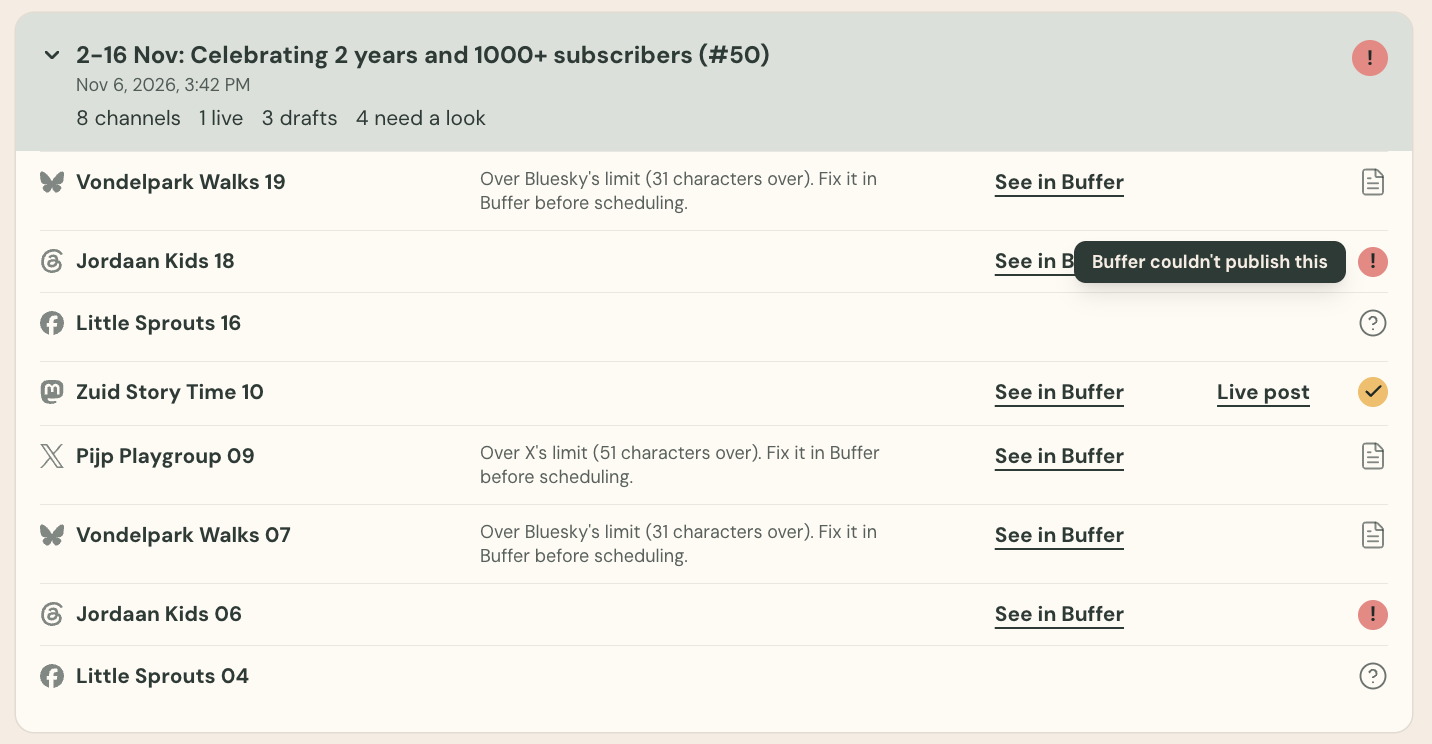
I hit Send now on a Pollen Picks post going to my real LinkedIn, all excited... and immediately panicked. The spinner just spun, I couldn't find a record in Buffer, and a published post can't be undone. I had no idea: Did the post go out or not?
Down the queue rabbit hole we go...
Why I built my first queue
I needed Pollen Picks to send the post, and keep a record of what happened to it. Send now gave me a lovely nudge to build a queue from scratch for the first time — getting to implement a simple table and lease, no extra infrastructure, because it was the right design decision for the user experience. This is what queues are for!
Press Send and I write one row per channel, then answer right away. Close the tab, switch devices: the queue keeps going. Each row is claimed with a 60-second lease, so two workers never grab the same post. A row lost halfway becomes "unknown", never a retry.
Your work is kept too:
- Cross-device: Your current run is saved to your account, so you can carry on from another device. This one was a bonus for me, as I often edit in both mobile and desktop!
- Same-day retry: A failed or unclear post keeps its caption for 24 hours so Retry has something to send. Once a post is created, the caption is erased.
- Draw slides on demand: A finished creation (beyond the caption) stays until you delete it, since slide images aren't stored — they're redrawn from your picks.
The queue allows me to handle iffy situations with ease. For example:
- Safely wait out rate limits: A 429 status (or 200 with
RATE_LIMIT_EXCEEDED) means nothing was created, so the post waits 20, 40, 80, 160, then 300 seconds, up to six tries. Since the rate limit is shared across the app, I send two posts at a time to stay well under the limit. - Never retry an unclear publish: A timeout or server error means the post might exist — but Pollen Picks doesn't have enough information, so it's marked "unknown." I redirect you to Buffer, so you can handle it accordingly. That's how nothing goes out twice.
- Fall back to draft if the post is unsuitable: If "Send now" fails — for example, a caption that is too long, or an image that is too big — we default to draft mode for that channel and surface a warning for you to adjust your post in Buffer directly.
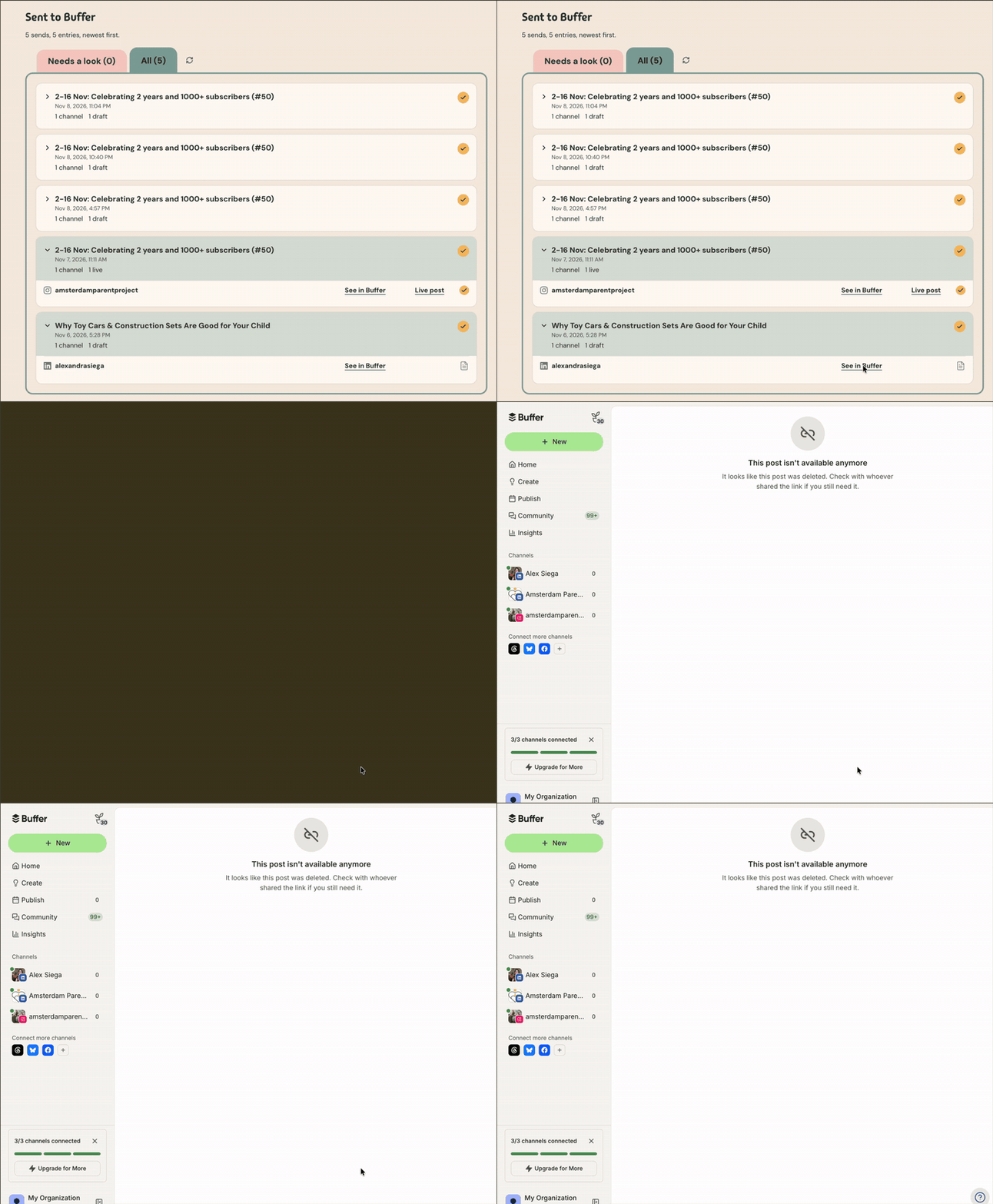
We found a bug!
Keeping two systems in sync is more complex than anticipated
The moment Pollen Picks hands a post to Buffer, two systems each hold part of the truth. I know what I sent from Pollen Picks, and Buffer knows what happened next.
Funny enough, the immediate posts are the easy ones to handle — it's the drafts that are tricky. You might publish a draft, schedule it, or delete it in Buffer, and Pollen Picks only finds out if it asks. So History now asks Buffer about your drafts on every load, in one batched request (up to 25 drafts), and puts the answer back: still a draft, a live link, "Scheduled", "Deleted in Buffer", or whatever Buffer says now. Buffer's rate limit is shared by every user of the app, so the checks wait behind sends and stop the moment Buffer says slow down.
How I made sure it worked: Fake mode 👻
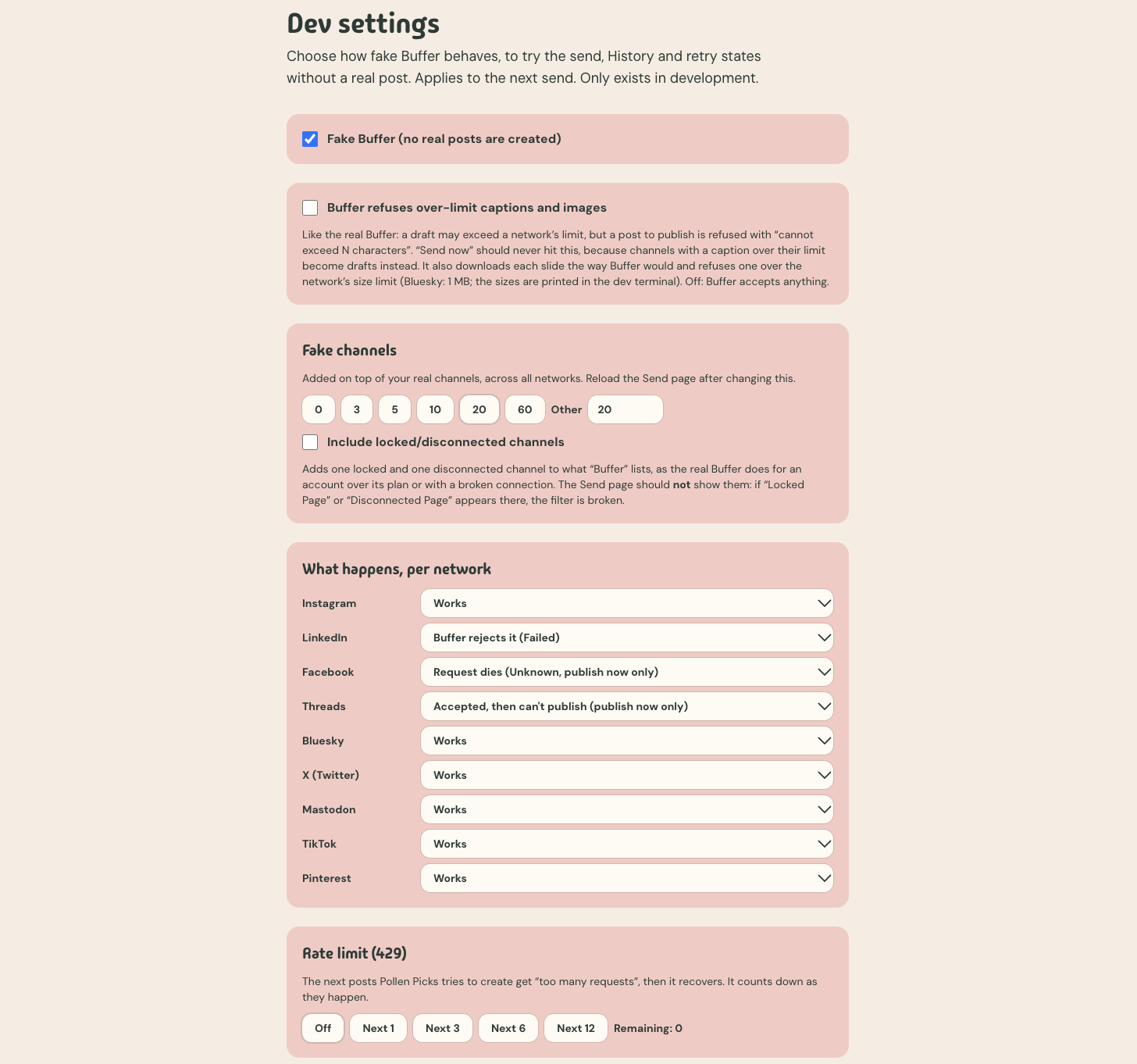
Fake mode helped not only test the app's resilience, but also refine the user experience when the user's profile was very different to my own.
I built Pollen Picks because of a pain point in my own newsletter-to-socials pipeline — so I am happy user #1. However, I only have Instagram and LinkedIn, and there was no way for me to stress test my app like a Buffer employee would.
So I built a Pollen Picks "fake mode" that behaves like a very prolific social media manager trying to work with Buffer on a bad day. Scenarios like:
- Buffer moans: Reject a post, time out so I can't tell if it exists, accepts the post and then fails to publish it, a 429 (and also 200 😅) rate limit
- Channel groans: Scale up to 200 channels, locked and disconnected channels
- Network scaries: Character limits, image-size limits (Did you know that Bluesky's image limit is only 1MB, compared to Instagram's 8MB? That necessitated a whole new image format...)
It never runs on the live site, so a stray setting can't turn a real send into a fake one.
Of course I have test coverage as well — over 600 tests — but being able to create a fake mode helped not only test the app's resilience, but also refine the user experience when the user's profile was very different to my own.
"The post is there... but why aren't the slides showing?"
After I got the queue implemented, I ran into another problem: My Buffer drafts showed blank green placeholders where the photo slides should have been; the slides took a long time to render.
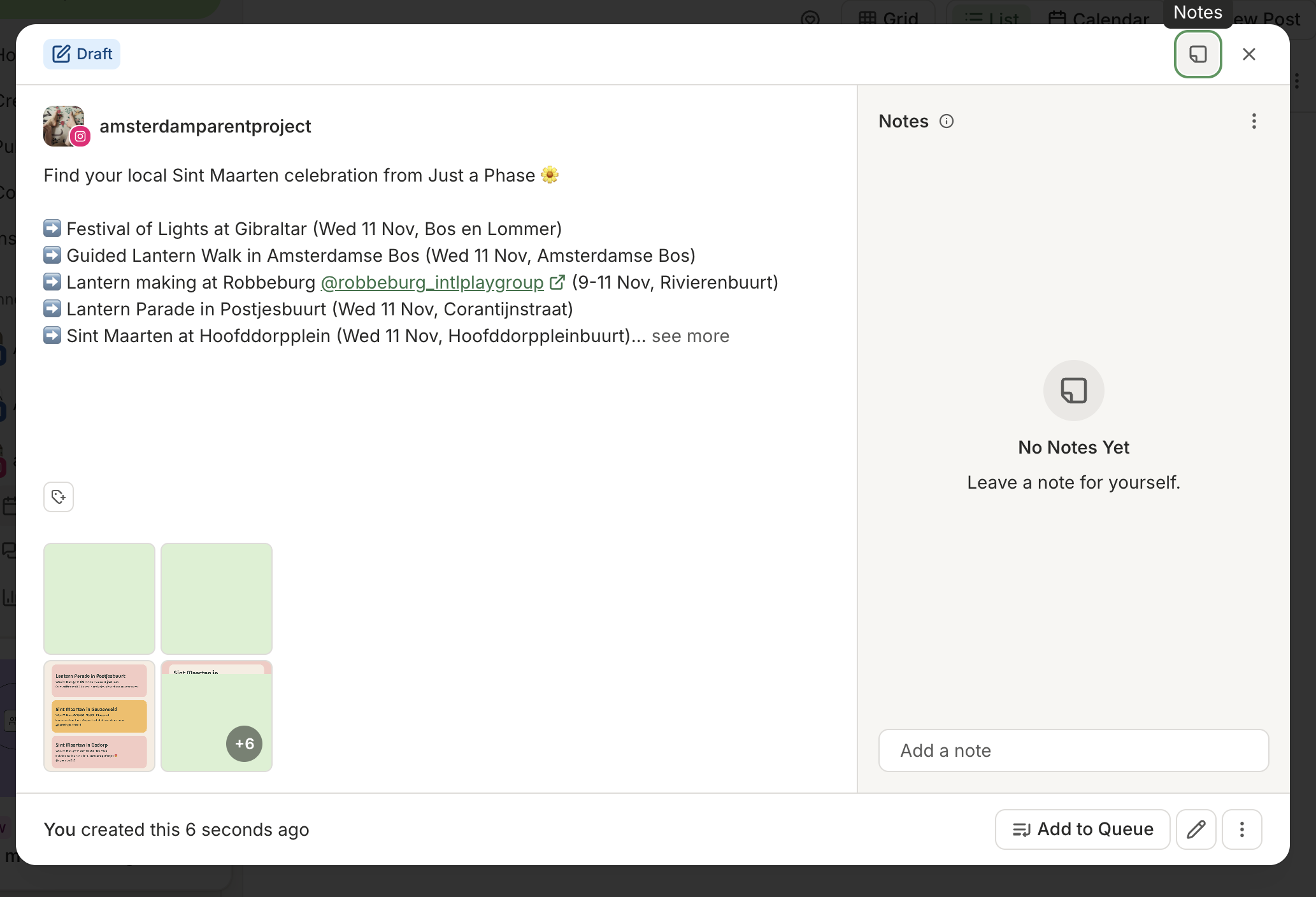
Pollen Picks doesn't store images — each slide is drawn when it's asked for. Buffer asks when the post is created, and a cold photo slide is quite slow. I suspected two things first:
- 5-minute cache: Now a year (
immutable), because a slide URL contains exactly what it needs to draw it. - Warm-up: It waits 12 seconds at most, on purpose. A worker killed mid-wait leaves "unknown" rows in Pollen Picks.
In fact, the real culprit was one header: "Netlify Durable"; fwd=bypass. If you set a header by hand, you skip Netlify's shared cache unless they say durable. Amazing how one word made it much faster: from seconds to under 1.
A huge tradeoff: Your posts expire
There's a huge downside to not storing images: slide links expire after 14 days. Buffer advises against signed URLs for images (which is what powers the draw-on-request approach), I assume for this reason.
I don't want my users to quietly lose their work, so I've built a way to nudge users to publish their Buffer drafts before the expiration date. When a Buffer draft created from Pollen Picks is more than 10 days old, I show a warning — "Slides expiring soon" — on the page. After 14 days, it changes to "Slides expired." The draft sync updates you on the status of your draft so you know whether action is needed, from Pollen Picks or Buffer.
The obvious fix is to store the slides — however, storage costs money that I didn't have. (Stay tuned for my next post about how and why Pollen Picks costs nothing to run, and the product tradeoffs that come with it.)
How I use Buffer now
Each piece is tied to a real user need — so that Pollen Picks only does what you need it to do, with the assurance that everything is okay.
| Buffer API | The user experience | The deliberate part |
|---|---|---|
| Sign-in (OAuth 2.0, PKCE) | Connect once, stay connected | Refresh tokens are single use, so each new one is saved immediately |
| Channels | Choose where each post goes | One request per organization, in parallel. Discard channels that can't take a carousel or are locked/disconnected. |
| Creating a post | A carousel lands as a draft or goes out now | Surface Buffer errors and unknowns. Fall back to draft if send now fails. Every slide is drawn first, so a broken one stops the send. Bluesky gets small JPEGs. |
| Reading a post back | See what actually happened, even after I change it in Buffer | Status, time and link come from Buffer, 25 posts per request. Every History load re-asks about drafts, so a post published, scheduled or deleted in Buffer shows up. Sends go first, and checks stop when Buffer says slow down. |
From "where did it go?" to queueing with confidence
Send now turned a forgiving draft into something that has to be right — it's going to your social media followers, after all. The queue is how I made it safe to press, and the sync is how I earn your confidence that Pollen Picks is getting your words out there.
Try the demo (free, no login needed): pollenpicks.netlify.app.
The code is open: github.com/alemosie/pollen-picks. Built for Buffer Commit, and I'd love your feedback before 11 Nov to make this the strongest contest entry possible!