

- Published on
Behind the Desk #5: I need it to be free: Building Pollen Picks the nonprofit way
- Authors

- Name
- Alex Siega
- Title
- APP Founder
- Socials
NOTE
🪑 Behind the Desk: Pollen Picks edition
Behind the Desk is where I share founder’s notes from running Amsterdam Parent Project. This edition is about Pollen Picks, the newsletter-to-socials tool I’m building for APP and entering in a contest called Buffer Commit. Transparency is one of APP’s core values, and I'm sharing my Pollen Picks build journey like I do everything else: what worked, what broke, and what I got wrong.
Pollen Picks solves my own pain point: turning APP's newsletter’s activity roundup into social posts without another every-other-Sunday panic. I’m a local toddler mom and run APP solo, so time is my greatest asset — making tools like Pollen Picks essential to APP.
I'm on a mission to use my skills to create deeply integrated community care for local & expat postpartum families in Amsterdam. Join me ❤️
I run Amsterdam Parent Project (APP), a self-funded nonprofit, on my own, about three days a week. I have so much work to fit into those three days, and I've built a lot of software to help — my latest being Pollen Picks, a newsletter-to-socials tool that turns my family activities digest into carousels on APP's Instagram and LinkedIn accounts.
There's one golden rule of software that I write for APP: it has to run as cheaply as possible, without sacrificing user experience. I applied the same ruthlessness to Pollen Picks, my Buffer Commit entry: 1) It has to run at no cost to me, and 2) no cost to anyone who uses it in the standard way. Every decision below is a trade: what I wanted, what the free tier did to it, and what I did instead.
The biggest caveat up front: This approach works for small-scale community ventures like APP. If Pollen Picks (or Postpartum Post, another of APP's flagship services) attracts a lot of users, I'm going to start having to pay — which will prompt either a massive stack restructuring or a hefty bill 💸
The stack
| Platform (or my own version) | What I use it for | The free-tier good & the bad |
|---|---|---|
| Netlify | Hosting | Only allowed 3 sites per account, and APP work took all of my slots — so I had to create a new account for Pollen Picks. I'm also using a Netlify app domain to avoid paying for a domain name. |
| Supabase | Database, with a separate dev and prod project | Only 2 projects per free organization allowed (taken up by APP), so Pollen Picks got its own account. I also have to make calls to the db regularly to ensure it keeps working. |
| Supabase Storage | Slide files | 1GB on the free tier, which is about 350 creations. Limited the experience to final slides of a send only, one file per image, deleted 30 days after a post is over. There's also a 5GB egress limit, equivalent to roughly 1,500 creations per month if Buffer fetches each image once. |
| beehiiv | Newsletter source, with an API key | I wanted beehiiv OAuth, but it's only available on paid plans. API keys are available on all plans, including free, but require user setup — a tradeoff I had to make. |
| Buffer API (OAuth 2.0 with PKCE) | Posting | Log in is limited only to Buffer users, which limits the potential user base. Rate limit is shared across every user of the app. Everything else is free 🙏🏻 |
| Handwritten parser | Pick parsing | AI usage through an API costs money, so I did it the old fashioned way — parsing. We sacrificed AI magic for no hallucinations, just what's on the page. (Plus a good interface for updating whatever's parsed.) |
| Apify | Instagram handle lookups | Falls within the $5/month in free credit, shared with my other APP automation. I only look up picked links and cache results per link, to avoid as many lookups as possible. I also introduced a lookup cap at 20 per account. |
| My own image renderer | Slides | No Canva Enterprise, so no template API. Had to make my own slides, which couldn't easily allow other users to upload their own templates. (I'd like to do this soon.) It's built on Next.js image generation. |

My cobbled-together free-tier stack feels like three possums in a coat, pretending to be real software. Also, go buy these stickers on Etsy ❤️
Trade 1: Parse with code, not AI
While I used AI to generate the code, the code itself has no AI library in it. I can't afford an AI model call on every pick — plus, for newsletter and blog creators who put in the work to write in the first place, it didn't feel right to replace their words with an AI facsimile.
Pollen Picks reads every pick with plain rules, and the author's own text goes on the slides. The rules, in short:
- Chunk based on the page structure: Every paragraph and list item becomes a pick. Its surrounding headers become the category or section.
- Use humans (not computers) to identify what's important: For event and resource digests, your subscribers already told you what they liked the most by clicking on it. Pollen Picks ranks based on unique verified clickers, so what humans clicked on most floats to the top.
- Read dates with cue words, and drop picks with past dates: The date line first, then the middle of the text only when a weekday or “join us” backs it up. “Deadline” dates are ignored, and past items are dropped before ranking.
- Keep the words. Nothing is rewritten. If something is too long, we show it on the slide with an ellipsis, and give you the opportunity to edit it.
- Extract the link text as the pick title: For events that link to the event page, it's a very handy format to have link text as the title, surrounding description below.
I've tested the parser on 4 different layouts based on real, popular beehiiv newsletters (see Fake mode from my previous post), as well as my own live newsletter. The full rules are in the repo: About 1,100 lines of parsing code and 100 tests 🚀
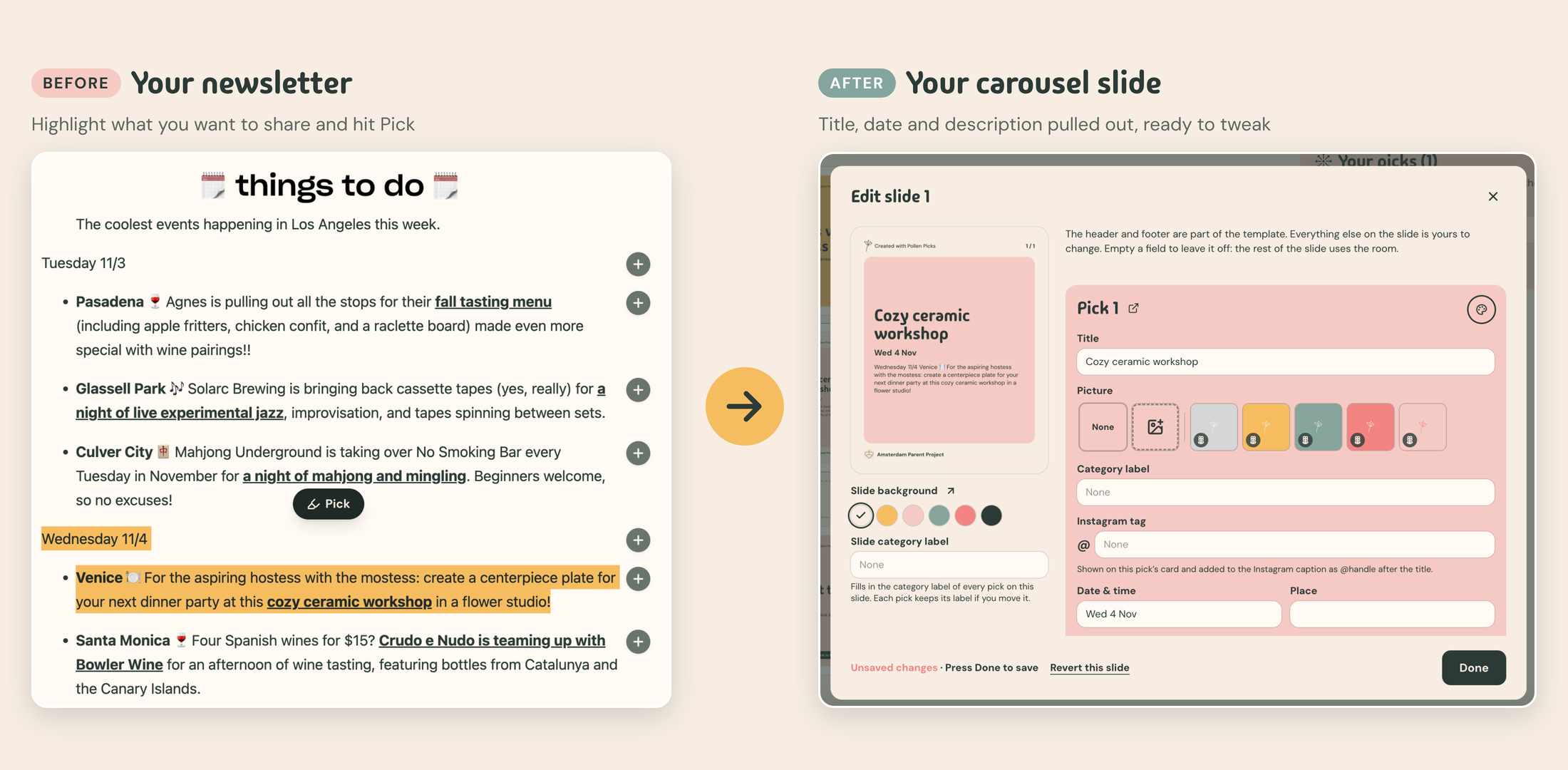
Highlight + pick, or press + to pick the whole paragraph — then let the parser do the rest. I tested Pollen Picks on Camber, a popular events digest for LA-based folks.
What it cost
- Parsing is format-specific, and keyed to my newsletter format (though tested with others). To solve this, I made manual mode delightful — highlight to pick, plus select full paragraph — so that it's still a good experience, instead of incorrectly guessing the structure of your source text.
- Just English: It can't process non-English dates. Capitalization matters: 21 November (English) gets parsed, while 21 november (Dutch) does not.
- Drop ambiguous dates: Relative dates like “next Friday”, recurring events, and ambiguous dates like 10/5 don't get parsed. An AI model would be great at this.
- Rely on human polish to make it perfect: It's unlikely that your words don't need some editing before you hit "send" on a Pollen Picks creation. AI could have done it for you, but we're betting that you'd rather spend more time editing YOUR draft, over an AI draft.
- Instagram handles cost a real API call: Finding the account behind a post link is something AI could do for free-ish, but I do it manually through Apify, which draws on a $5 monthly credit — which I also use for APP operations. So I only look up links you’ve picked, cache every result, and cap it at 20 lookups per account. After that, you have to bring your own Apify token.
What I got
- Amazing parsed picks for my newsletter, without AI. I can generate a carousel through Pollen Picks with my content in about 2 minutes end-to-end 🤯
- A delightful "straight from source" experience for other sources through the manual picker — with some light parsing and formatting to make slides easier to build
Trade 2: Minimize storage at all costs (literally)
At first, I didn't want to build storage to save your creations. A storage bucket meant more limits to watch, more retention complexity, and product decision-making how to clean up stale files to balance the user experience with the free-tier constraints.
So Pollen Picks V1 stored nothing. Each slide was a signed link — like a recipe for image creation — that made the image whenever Pollen Picks or Buffer asked for it. Beautiful, simple, on-demand.
But Buffer warns against signed and expiring URLs — they “often work the moment you call createPost but expire before the post publishes, causing it to fail silently.” I did it anyway, thinking I could build enough warning into Pollen Picks to work around the rough edges.
Then I opened up Buffer an hour after sending a draft through Pollen Picks, and saw this:
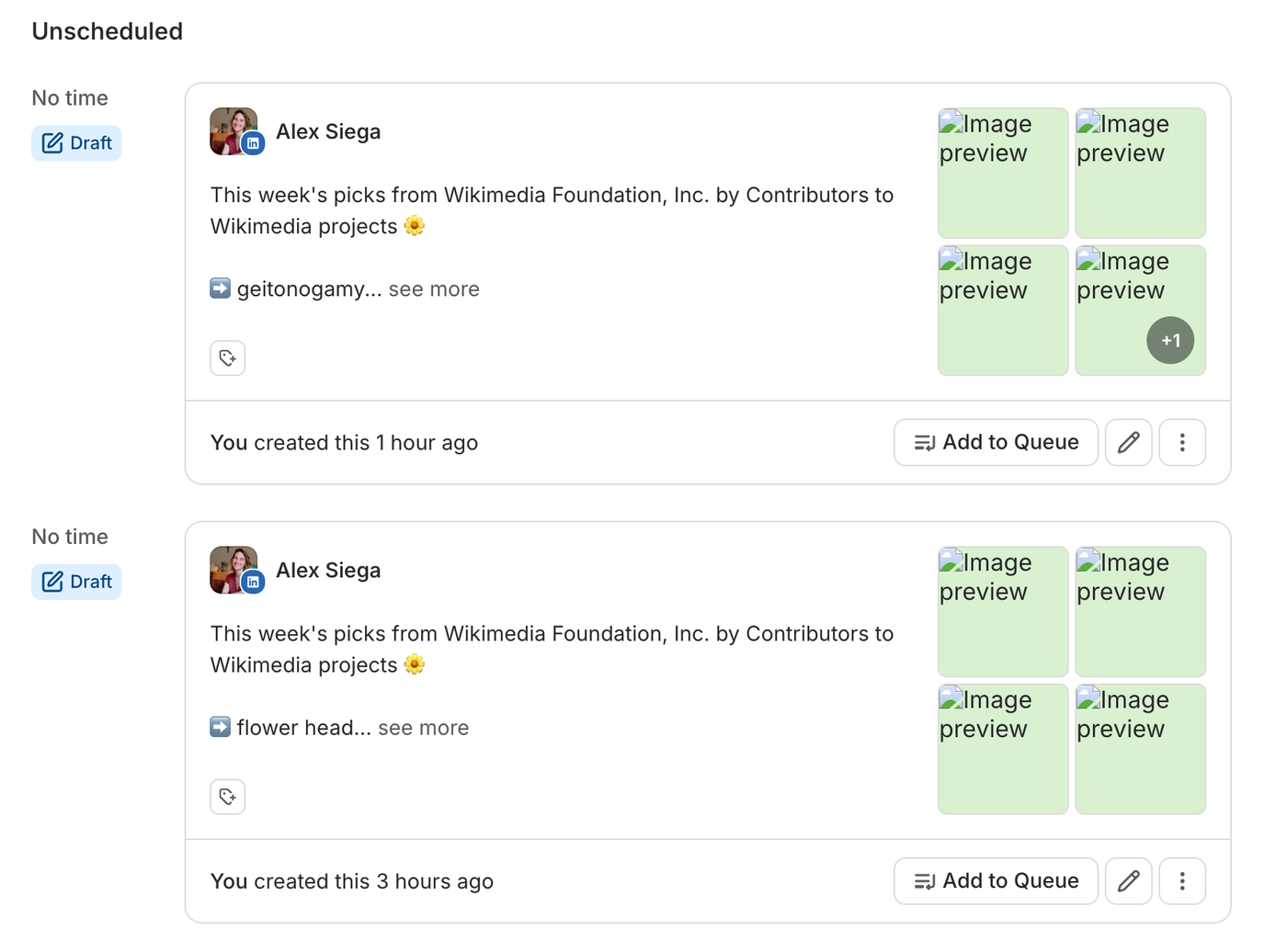
The signed link approach meant that certain types of picks and changes to slide style settings invalidated the slides that you had sent, resulting in a lost image. For a product whose sole purpose was to make pretty carousels out of text, this was completely unacceptable.
So my compromise was to include storage, but very intentionally. Slides are drawn once, when you hit Send or Create draft, by the same code as the preview. The final images go in one Supabase bucket and Buffer gets those addresses. If storing fails, it falls back to the old signed links. (Good for something, at least?)
How I keep storage as small as possible:
- Only final slides: Previews, demo creations and saved creations never touch the bucket.
- One file per image: Names are a hash of the picture, so a retry or a second channel reuses the same file.
- Aggressively clean up: We clean up finished posts (published, deleted in Buffer or failed) after 30 days. Drafts and scheduled posts keep theirs, since Buffer fetches again when they publish.
- Delete your account, delete your slides.
What it cost
A public storage bucket, befitting a public newsletter → social media tool, but still open. Extra code, meaning complexity to maintain. Yet another platform limit to keep an eye on.
What I got
Reliability that Buffer has what you created.
Trade 3: Rely on human triggers, not cron
On a normal website that requires a status update, you'd use polling — essentially asking the database every X seconds or minutes on the status of a record, so that what you see on screen is the most up-to-date information.
If I were to do that with my free-tier stack, I'd use a Scheduled Function in Netlify. A request every minute would be 43,200 runs and up to 240 credits a month — seriously threatening a 300-credit free plan that could take down all of Pollen Picks without warning if the credits ran out.
Instead of a timer, I opted to send for status on page load. Whenever someone opens History, we ask for the most updated status and display it — we don't update the page unless you visit it. Same goes for image clean-up; cleanup runs when History refreshes.
What it cost
A post that gets stuck between the Pollen Picks and Buffer divide waits until the next visit to go through. Slides from an old draft stick around unless you're using the app.
What I got
Nothing is lost or duplicated, and I'm not taking my whole site down for third-party record status updates. Seems like a win 🤝
This is my take on sustainable software
APP as an organization is centered on human connection; we're the infrastructure sustaining the new parent community here in Amsterdam. In an age when AI makes everything easy, I've chosen to solve inherently hard, messy — human — problems. Sometimes that means cobbling together a free-tier stack and a few honest trades. It’s not the most elegant way to build, but it means Pollen Picks costs me nothing to run and costs you nothing to use in the standard way.
Try the demo, no Buffer account needed: pollenpicks.netlify.app